If you’ve spent any time scrolling through “Side Hustle Twitter” or watching “Make Money Online” videos, you’ve definitely heard the term YouTube Automation.
It sounds like a dream, doesn’t it? You upload videos without showing your face, you don’t have to hold a camera, and checks from Google just magically appear in your bank account. It’s often sold as the ultimate “lazy” business model.
Let me stop you right there.
In 2025, YouTube Automation is not a get-rich-quick scheme. It is a legitimate media business model. It is digital real estate. And just like building a house, if you try to cut corners with cheap materials, the whole thing will collapse.
However, if you build it right—using the right tools, the right psychology, and a hefty dose of patience—it is arguably the most scalable online business in existence. You are essentially becoming a digital producer. You are the director, not the actor.
Whether you want to replace your 9-to-5 or just fund your next vacation, this is your blueprint. We are going to strip away the hype and look at the actual mechanics of building a faceless channel that survives and thrives in the modern algorithm.
Phase 1: The Mindset & The Niche (The “Why” Before The “How”)
Before you even think about opening ChatGPT, you need to understand the economy of YouTube. Advertisers pay YouTube to show ads. YouTube shares that money with you. But not all viewers are created equal.
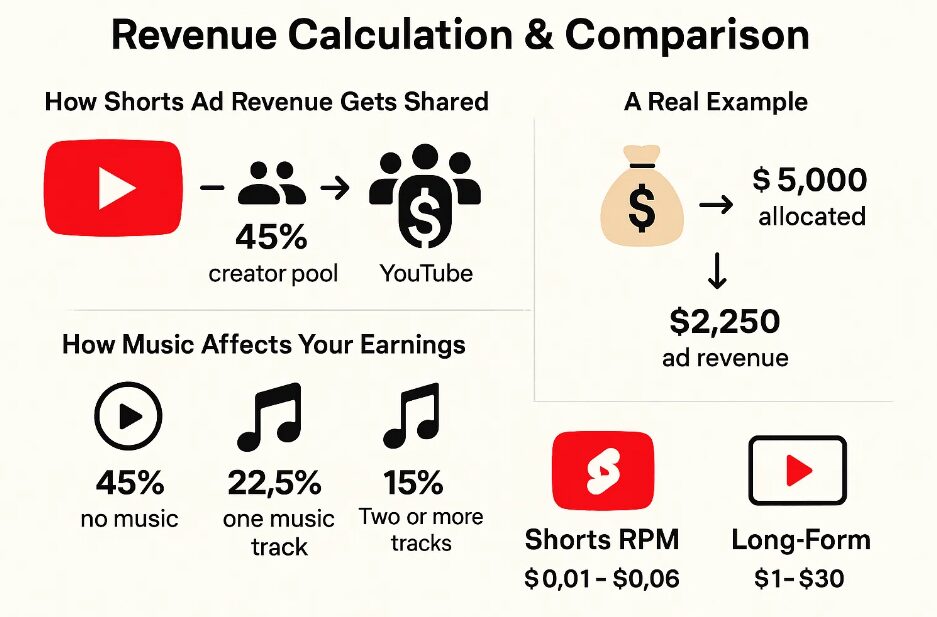
This is where CPM (Cost Per Mille) comes in. This is how much advertisers pay per 1,000 views.
If you start a channel about “Funny Cat Compilations,” you might get millions of views, but your CPM will be low (maybe $1 to $2) because advertisers don’t pay much to reach people laughing at cats.
If you start a channel about “Personal Finance” or “SaaS Software Reviews,” you might get fewer views, but your CPM could be $20 to $40. Why? Because banks and software companies have deep pockets.
The Best Niches for 2025
When choosing a niche, you need the “Golden Trio”: High Search Volume, Evergreen Potential, and High Monetization.
1. The “Health & Wealth” Sector (High CPM)
- Finance Tips: Explaining credit cards, crypto trends, or how to save money.
- Business Stories: “How Starbucks Failed in Australia” or “The Rise of Nvidia.” These are documentary-style videos that pay incredibly well.
2. The “Tech & AI” Sector (Trending)
- AI Tutorials: The world is changing fast. People are desperate to learn how to use tools like Midjourney or Claude. If you can simplify complex tech, you will win.
- Gadget Comparisons: You don’t need the physical product. You can use B-roll and spec sheets to compare the iPhone 16 vs. Samsung S25.
3. The “Curiosity” Sector (High Volume)
- Psychology & Facts: “10 Psychological Tricks to Read Anyone.”
- True Crime / Mysteries: This niche is saturated, but if your storytelling is good, the audience is infinite.
- Stoicism & Philosophy: This has exploded recently. Simple visuals with a deep, calm voiceover discussing Marcus Aurelius quotes.
The Strategy: Don’t just pick a topic. Pick a specific angle. Don’t do “Fitness.” Do “Fitness for Dads over 40.” Don’t do “Tech.” Do “Productivity setups for students.” Specificity builds loyalty.
Phase 2: The Production Line (Your Free Tech Stack)
In the past, you needed a $2,000 camera and a studio. In 2025, your “studio” is a browser tab. The goal here is to create a workflow where you can produce content without burning out.
Step 1: The Blueprint (Scripting)
The script is the skeleton of your video. If the script is bad, the video is unwatchable, no matter how good the editing is.
- The Tool: ChatGPT (OpenAI) or Claude 3.
- The Workflow: Do not just ask ChatGPT to “Write a script about healthy eating.” It will sound robotic and boring.
- The Hack: Use a prompt like this: “Act as a professional YouTube scriptwriter. Write a 1,500-word script about ‘The Dangers of Sugar’ that is engaging, uses a hook in the first 10 seconds to grab attention, and speaks in a conversational, slightly controversial tone.”
- Human Polish: Once the AI gives you the draft, put it into Google Docs. Read it out loud. If you stumble over a sentence, delete it. Add your own jokes. Add current references. AI provides the structure; you provide the soul.
Step 2: The Voice (Audio)
This is where most beginners fail. YouTube is cracking down on “low effort” content. If your video sounds like a robotic GPS navigation system, YouTube might demonetize you for “Repetitious Content.”
- The Tool: ElevenLabs (The gold standard).
- The Strategy: While the free tier is limited, it’s the most realistic. If you want to stay 100% free, look at Uberduck or Clipchamp’s built-in text-to-speech.
- The Pro Move: The best “free” tool is your own voice. Buying a $30 USB microphone and recording the script yourself instantly makes your channel unique. No one can copyright strike your own voice. It builds a connection that AI cannot replicate.
Step 3: The Visuals (Video Editing)
You need to cover your audio with footage. This is called B-Roll.
- The Tools: CapCut (Desktop or Mobile) is currently the king of free editing. It has auto-captions, transitions, and effects built-in. For more advanced users, DaVinci Resolve is Hollywood-grade software that is free.
- Stock Footage: Use Pexels or Pixabay.
- The “Fair Use” Doctrine: You can also use clips from movies, interviews, or other YouTubers if you are transforming the content. This means you are commenting on it, critiquing it, or using it for educational purposes. However, be careful. As a beginner, sticking to royalty-free stock footage is safer.
The Editing Rule of Thumb: Change the screen every 3 to 5 seconds. Zoom in, zoom out, pop up text, change the clip. The modern attention span is destroyed; you need to constantly stimulate the viewer’s eye to keep them watching.
Step 4: The Packaging (Thumbnails)
You can have the best video in the world, but if no one clicks, it doesn’t exist.
- The Tool: Canva.
- The Strategy: Use the “3 Element Rule.” Your thumbnail should generally have:
- A clear focal point (a face, an object, or a before/after comparison).
- Bright, contrasting colors.
- Text that complements the title, not repeats it.
- Bad Example: Title: “How to Run Fast.” Thumbnail Text: “Running Fast.”
- Good Example: Title: “How to Run Fast.” Thumbnail Text: “Do This Every Morning.”
Phase 3: The Algorithm & The Upload
Uploading is an art form. You are effectively feeding data to a supercomputer (the YouTube Algorithm) and hoping it knows who to serve your food to.
1. SEO is NOT Dead
Search Engine Optimization still matters for new channels. When you have 0 subscribers, the algorithm doesn’t know who your audience is. You have to tell it.
- Keywords: If your video is about “Bitcoin,” use the search bar to see what people are typing. “Bitcoin prediction 2025,” “Bitcoin crash,” etc. Put these in your description naturally.
- Tags: They matter less now, but still use them.
2. The Holy Trinity of Metrics
Forget about subscriber count. It is a vanity metric. There are only two numbers that truly matter:
- CTR (Click-Through Rate): How many people see your thumbnail and click? A good aim is 4% to 8%. If it’s below 2%, change your thumbnail.
- AVD (Average View Duration): How long do they stay? If people click off after 30 seconds, YouTube stops promoting the video. This is why your script needs a “Hook” right at the start. Don’t waste time with “Hi guys, welcome back to the channel.” Just start the story.
3. The Session Time Hack
YouTube wants people to stay on the platform. If your video finishes and the viewer leaves YouTube, the algorithm penalizes you. If they watch your video and then watch another one of your videos, you get a massive boost.
- How to do it: Use Playlists and End Screens. At the end of your video, don’t say “Thanks for watching, bye.” Say, “If you thought this was crazy, you have to see what happened in this video,” and point to the End Screen element.
Want to start earning fast? Check out my full guide on How to Make Money on YouTube Shorts in 2025 (Step by Step)
Phase 4: Show Me The Money (Monetization)
Most people think AdSense (YouTube paying you for views) is the only way to make money. That is rookie thinking. AdSense is just the cherry on top. The real money is in the cake.
1. The Partner Program (AdSense)
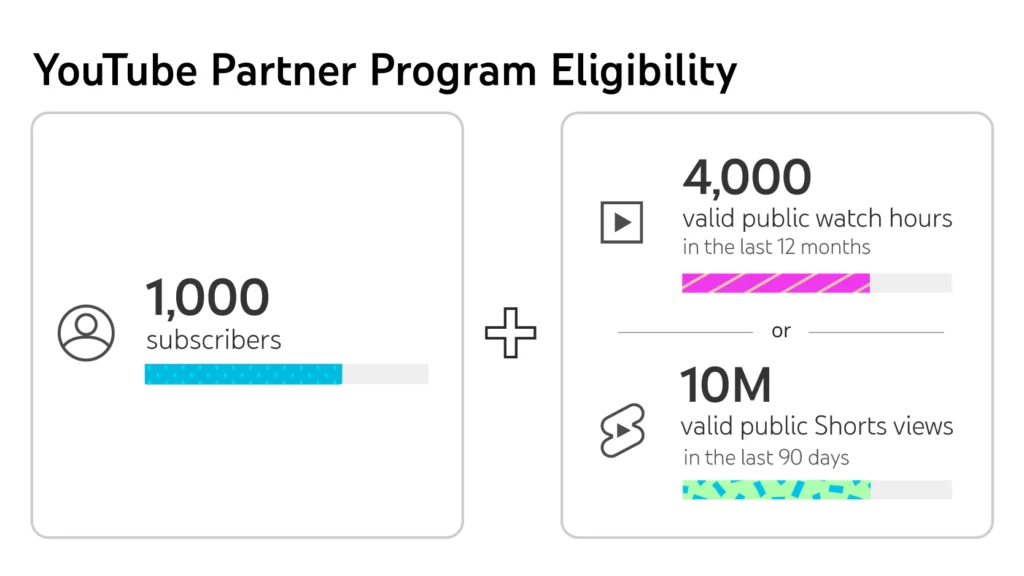
To get this, you need 1,000 subscribers and 4,000 watch hours. This usually takes 3 to 6 months of consistent work. Once you hit this, you get paid monthly.
2. Affiliate Marketing (The Real Cash Cow)
You can start this from Day 1.
- If your channel is about “AI Tools,” sign up for the affiliate program of the AI tools you review. Put the link in the description.
- If a tool costs $50/month and they give you a 30% commission, that’s $15/month recurring from one person.
- Amazon Associates is the easiest place to start. Review a microphone, link it below.
3. Digital Products
Once you have an audience, sell them knowledge.
- Channel about fitness? Sell a $15 workout PDF.
- Channel about productivity? Sell a Notion template.
- You keep 100% of the profit.
Phase 5: The “Dip” and How to Survive It
I’m going to tell you exactly what will happen.
You will spend 10 hours making your first video. You will upload it. You will refresh the page.
12 Views.
You will make the second video.
5 Views.
This is called “The Dip.” This is where 99% of people quit. They think the algorithm hates them. It doesn’t. It’s just testing you.
YouTube needs data. It takes time to figure out if your content is good.
- The 6-Month Rule: Commit to posting 2-3 videos a week for 6 months without looking at the view count. Treat it like a university semester. You are learning the skill of editing, title writing, and storytelling.
- Batching: Do not try to make a video every day from scratch. You will burn out in two weeks.
- Monday: Script 4 videos.
- Tuesday: Record/Generate Audio for 4 videos.
- Wednesday: Edit video 1 and 2.
- Thursday: Edit video 3 and 4.
- Friday: Schedule them all.
Phase 6: Future-Proofing Your Channel
The “robot voice reading Reddit threads” era is dead. It died in 2023.
In 2025, Quality > Quantity.
With AI, everyone can make average content. This means the market is flooded with garbage. To stand out, you need personality (even without a face) and high production value.
- Storytelling is King: Don’t just list facts. Tell a story. “Here are 5 facts about Mars” is boring. “Why Elon Musk is Terrified of Mars” is a story.
- Brand Building: Give your channel a personality. Use a consistent color scheme. Use a recurring joke. Make people feel like they are part of a club.
For official rules and detailed information on YouTube Shorts monetization, check YouTube’s official monetization guidelines page
Final Words: Is It Worth It?
Starting a YouTube Automation channel is essentially building a media startup with $0 in capital.
Is it easy? No. The “passive income” gurus lied to you. It requires active work, especially in the beginning. You have to learn graphic design, audio engineering, and copywriting.
But is it worth it? Absolutely.
Once a video is uploaded, it lives forever. A video you post in January 2025 can still be earning you money in December 2030. You are planting seeds that will grow into money trees.
Start small. Use the free tools. Ignore the low view counts in the beginning. Improve something small with every single upload—maybe today your audio is better, next week your thumbnails are better.
The only way to fail is to stop uploading. Good luck.